
We may earn commissions when you shop through the links below at no additional cost to you.
When building an isolated hacking lab or practicing active penetration testing, exposing your real host IP address to external target networks or untrusted lab ranges is a critical operational security (OpSec) flaw.
A standard VirtualBox setup using NAT or Bridged Networking routes your guest OS traffic straight through your home ISP without encryption. If a target server drops connection, logs active probes, or blocks your subnet, your real IP is fully exposed.
During our hands-on testing across local virtualized networks and cloud target ranges, we configured a bulletproof networking architecture. In this step-by-step guide, we will route your entire VirtualBox lab (Kali Linux, Windows Targets, or Metasploitable) through an encrypted tunnel using NordVPN, while enforcing a strict system-wide Kill Switch and leveraging Meshnet for isolated multi-device lab interconnectivity.
What Makes Host-Level VPN Tunneling Essential for Pentesting?
Not all virtual network adapters handle traffic isolation the same way. A simple host-only network keeps your VMs isolated from the internet, but it prevents you from downloading critical exploits or updating tools like Nmap and Metasploit.
When configuring an external encrypted tunnel for your virtual lab, we evaluate the setup across three non-negotiable security requirements:
Zero Packet Leaks: Ensuring DNS queries and WebRTC requests from inside the guest VM never bypass the host’s encrypted tunnel.
Low Latency Scanning: Maintaining high packet delivery speeds during intense port sweeping or banner grabbing.
Fail-Safe Disconnection: Automatically killing guest subnet traffic if the encrypted connection drops.
Step 1: Configure VirtualBox Network Adapters Properly
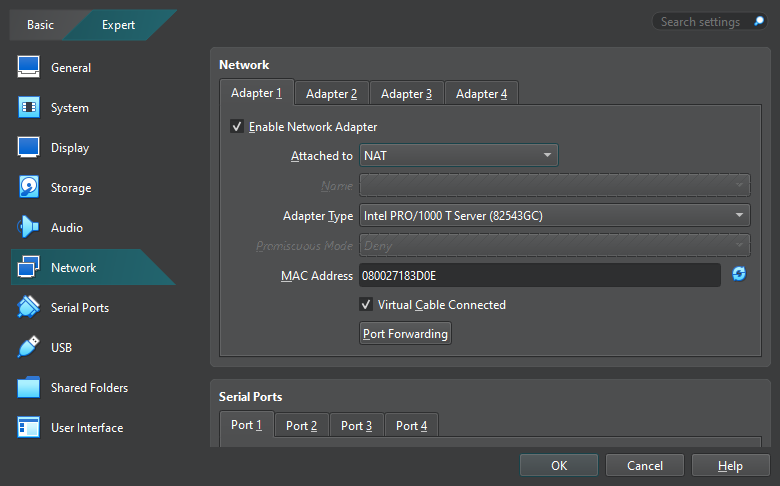
To force all VM traffic through your host’s encrypted interface without accidental bypasses, you must configure your VirtualBox Network Settings correctly.
Launch VirtualBox and select your primary pentesting VM (e.g., Kali Linux).
Click Settings and navigate to the Network tab.
Under Adapter 1, apply the following parameters:
Attached to: Select NAT (or Host-Only Adapter if you are pairing with a dedicated VPN Gateway VM).
Click Advanced and set Promiscuous Mode to Allow VMs if you plan to capture subnet traffic or perform local ARP inspection.
Step 2: Deploy & Configure NordVPN Kill Switch Setup on the Host
Before firing up your virtual machines, your host machine must establish a secure encrypted tunnel with active leak protection.
Launch your NordVPN client application on your host machine.
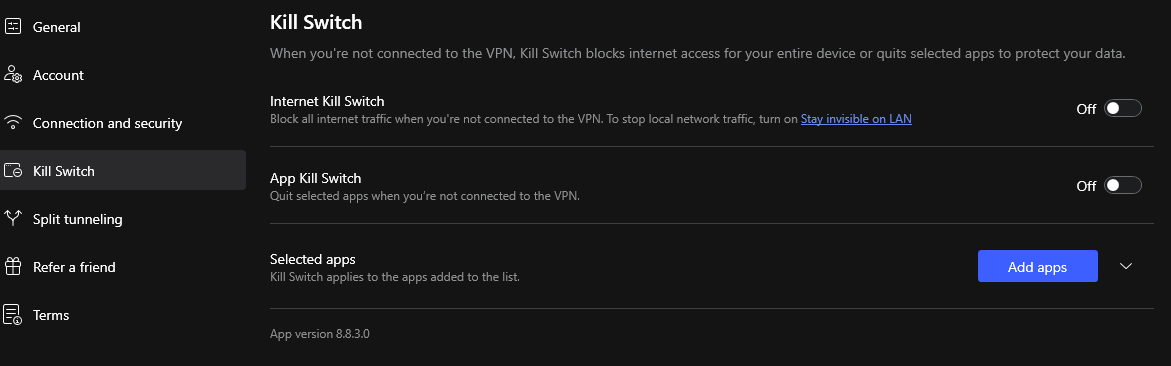
Navigate to Settings -> Kill Switch:
Enable both App Kill Switch and System-wide Kill Switch.
Why this matters: If the VPN connection hiccups, VirtualBox immediately loses internet access instead of silently falling back to your unprotected home ISP connection.
Navigate to Settings -> Connection and set the protocol to NordLynx (built around WireGuard). This delivers maximum packet throughput when running fast sweeps with tools like Masscan or Nmap.
Click Quick Connect or select a dedicated server location within your lab scope.
Step 3: Leveraging NordVPN Meshnet for Remote Pentesting Labs
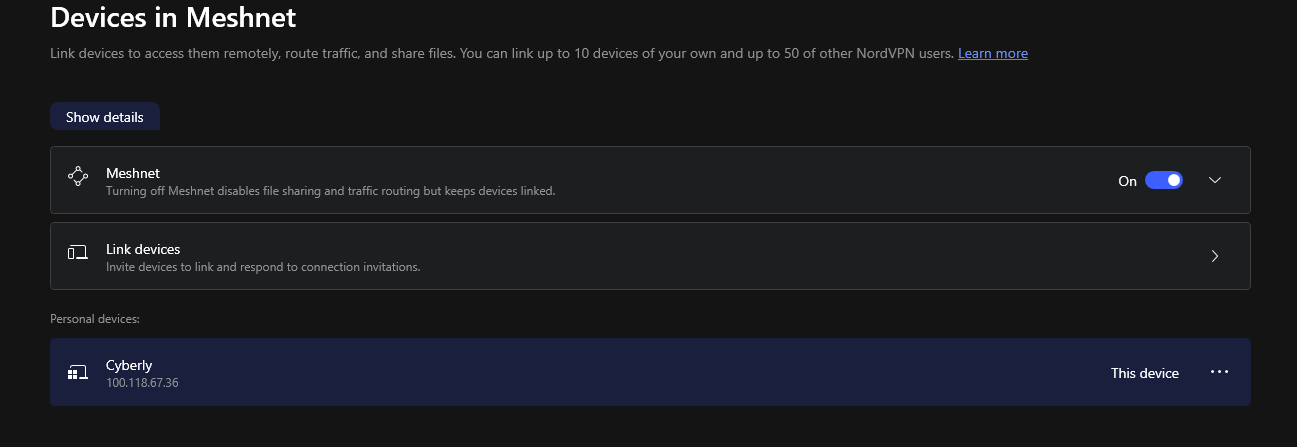
One of the most powerful features for modern lab setups is Meshnet. It allows you to create a secure, private network between multiple devices worldwide as if they were sitting on the same local area network (LAN).
If you have a primary host machine at home and a remote target machine or cloud server hosted elsewhere:
Enable Meshnet inside your NordVPN dashboard.
Link your secondary machine or mobile testing endpoint using its unique Meshnet IP or hostname.
Route your VirtualBox guest traffic through the Meshnet IP.
Now, your remote target machines and VirtualBox VMs communicate through an end-to-end encrypted tunnel without exposing open ports to the public internet.
Direct Technical Setup Comparison Matrix
Here is how different VirtualBox network configurations stack up when routing active security traffic:
| Setup Type | OpSec Protection | ISP Leak Risk | Setup Complexity | Remote Lab Support |
| Standard NAT / Bridged | None | High (Exposes Real IP) | Very Low | No |
| Host-Only Network | High (No Internet) | None (Offline Only) | Low | No |
| Host NordVPN + NAT + Kill Switch | Maximum | Zero (Protected) | Moderate | Yes (via Meshnet) |
Step 4: Verifying the Setup & Testing for Leaks
Never assume your lab is secure without active verification. Run these three quick tests inside your VirtualBox guest OS (e.g., Kali Linux Terminal):
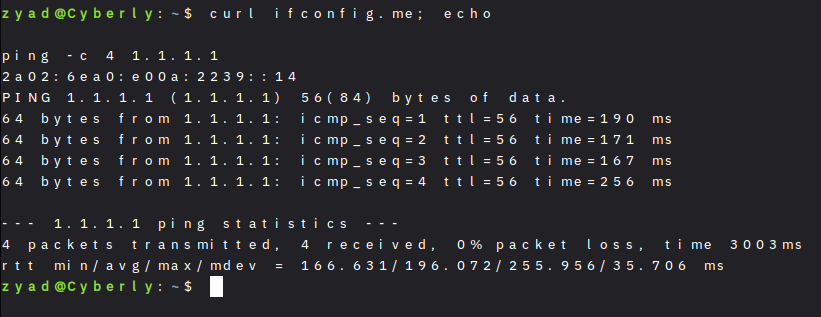
Check External IP Address: Execute the following command inside your guest terminal:
Verify that the returned IP matches your NordVPN server IP, NOT your home ISP address.
Verify DNS Leak Protection: Open the browser inside your VM and visit dnsleaktest.com. Run an extended test and ensure no local ISP DNS servers appear in the results.
Test the Kill Switch Failure: Manually disconnect NordVPN on your host machine. Immediately attempt to ping an external IP inside your VM:
The ping request must fail completely, proving zero unencrypted packets leaked.
How to Build a Secure Lab Recon Workflow
Relying on an encrypted tunnel is just one part of maintaining a robust lab environment. In our testing workflows, we combine network isolation with layered diagnostic routines:
Host Isolation: Route your VM traffic through an encrypted connection before running host discovery. If you are setting up your environment for the first time, check out our tutorial on How to Build Your First Hacking Lab Using VirtualBox 7.2.8.
Traffic Sweeping: Use host discovery tools behind your tunnel to map active subnets safely. You can review our comparative breakdown on the Top 5 Free Network Scanners for Vulnerability Assessment in 2026.
Network Encapsulation: If you are testing remote endpoints or conducting diagnostic scans across public Wi-Fi, ensure your tunnel uses stable encryption protocols as outlined in our guide to the 5 Best Paid VPNs for Hacking & Anonymity in 2026.
Summary & Best Practices
Routing your penetration testing lab through NordVPN provides a robust layer of operational privacy, preventing accidental IP exposure while enabling advanced Meshnet connectivity for remote lab environments.
Always keep your VPN client updated, maintain strict Kill Switch policies, and isolate your guest VMs from your local home LAN to maintain a maximum security posture.
❓ Frequently Asked Questions (FAQ)
Will routing VirtualBox through NordVPN slow down my network scans?
Using standard OpenVPN protocols can introduce latency during high-speed port scans. However, switching your connection protocol to NordLynx inside NordVPN minimizes overhead, allowing tools like Nmap or Masscan to run at near-native speed.
Can I run a VPN inside the guest VM instead of the host?
Yes, but running the VPN on the host level (with a system-wide Kill Switch) provides a stronger safety net. If a guest OS crashes or a script bypasses local proxy settings, the host-level tunnel guarantees that raw packets cannot leave your physical network unencrypted.
How does Meshnet differ from traditional port forwarding?
Port forwarding exposes your target ports to the entire public internet, making them vulnerable to automated botnet scans. Meshnet creates a private peer-to-peer network between your authorized devices, allowing you to access remote target VMs securely without opening public firewall ports.