
When we run security audits or map out targets in a lab, relying on raw intuition is a guaranteed way to miss critical exposure points. Network scanners are the foundational eyes of any security workflow, whether you are conducting basic reconnaissance or performing deep packet inspection.
During our hands-on testing across local infrastructure and isolated target ranges, we evaluated dozens of open-source and free utilities. Many tools out there are either bloatware or restricted behind aggressive paywalls.
In this breakdown, we highlight the top 5 free network scanners that deliver reliable, battle-tested results for vulnerability assessment without costing a dime.
What Makes the Best Network Scanning Tools & Port Scanners for Audits?
Not all scanning tools serve the same purpose. A fast port sweeper will not tell you if an Apache web server is vulnerable to an outdated SSL implementation, and a heavy vulnerability assessment engine will choke your subnets if you just need a quick host discovery.
When selecting free network scanners, we grade them across four distinct technical criteria:
Speed vs. Accuracy: The balance between rapid packet delivery and minimizing dropped frames on high-latency links.
Service & Version Fingerprinting: How accurately the tool probes banners to identify exact software iterations.
Scriptability & Extensibility: The ability to run custom detection scripts to automate vulnerability checks.
Protocol Support: Native handling of IPv4, IPv6, UDP, TCP, and low-level ICMP traffic.
1. Nmap (Network Mapper) & Zenmap: The Undisputed Recon King
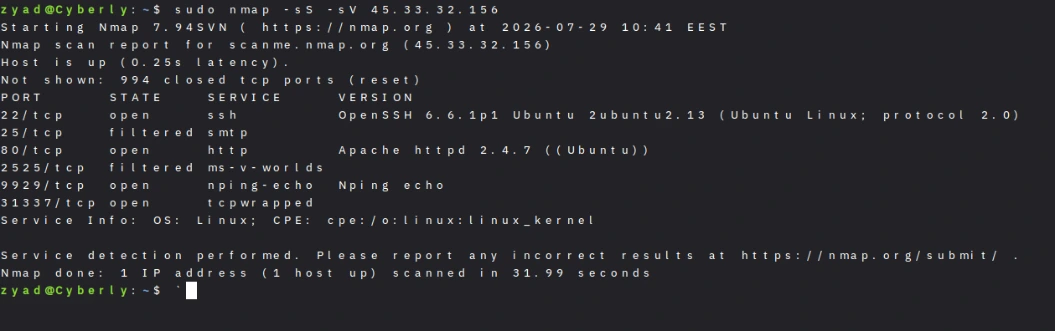
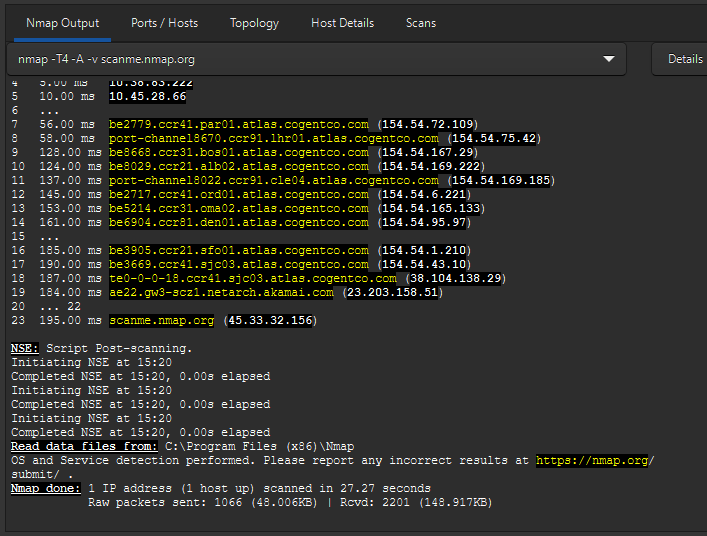
Nmap remains the absolute gold standard for network discovery and attack surface mapping (with Zenmap serving as its official GUI interface). If you are doing any form of ethical hacking or infrastructure auditing, Nmap is the first tool you execute after getting link layer access.
What makes Nmap irreplaceable isn't just its port scanning engines—it’s the Nmap Scripting Engine (NSE). During our tests, running default NSE scripts (-sC) alongside version detection (-sV) via command line or Zenmap instantly surfaced outdated SSH versions and unpatched SMB services without needing a heavy vulnerability scanner.
Key Capabilities
Flexible scanning modes (SYN Stealth, Connect, UDP, FIN, Null, and Xmas scans).
Advanced OS detection using TCP/IP stack fingerprinting.
Massive library of NSE scripts for vulnerability detection and NSE exploitation proofs.
The Downside
Running comprehensive scans with full script checks can be slow on large subnets (/16 or higher). You need to fine-tune timing templates (-T4 vs -T2) to avoid dropping packets or triggering network intrusion prevention systems (IPS).
2. Wireshark: Deep Packet Inspection & Protocol Analysis
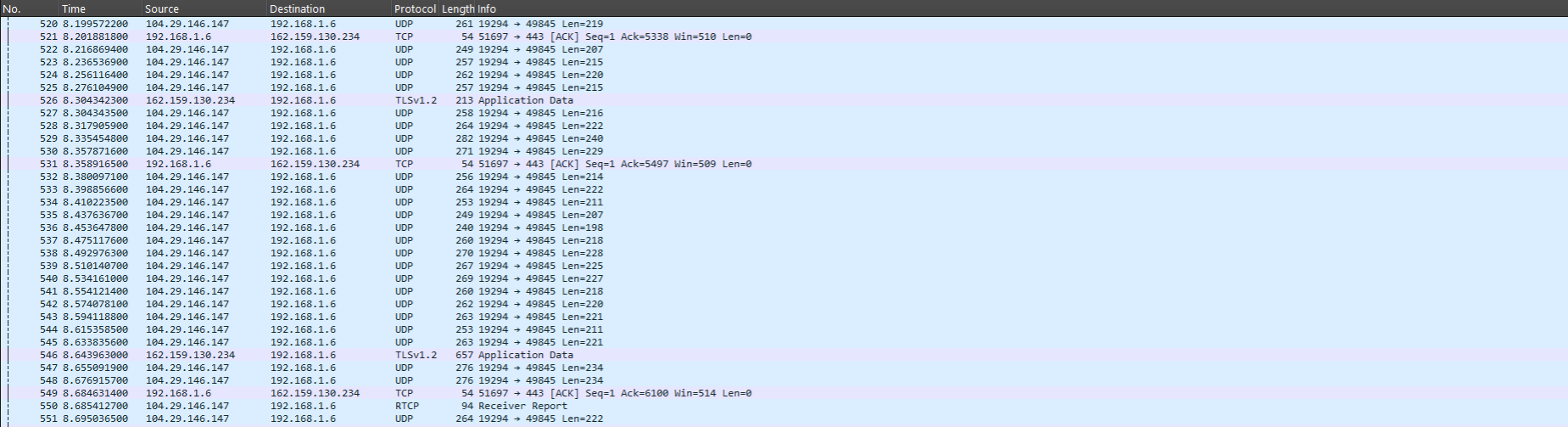
Wireshark is not a traditional port scanner; it is a packet analyzer. However, treating vulnerability assessment as purely "finding open ports" is a massive mistake. Wireshark allows you to analyze actual network traffic passing through your interface in real time.
When testing network defenses, we use Wireshark to verify if sensitive management traffic (like FTP, HTTP, or Telnet) is leaking cleartext credentials across the wire. It is also the ultimate tool for debugging why your active scans are getting dropped by local firewalls.
Key Capabilities
Microscopic inspection of hundreds of network protocols.
Live packet capture and offline analysis of .pcap files.
Powerful display filters (ip.addr == x.x.x.x && tcp.port == 80) to isolate malicious traffic instantly.
The Downside
It suffers from a steep learning curve for beginners. Processing massive .pcap files (exceeding 2 GB) can easily freeze system memory if you don't apply capture filters (bpf) before initiating the capture.
3. OpenVAS (Greenbone): Enterprise Free Vulnerability Scanner
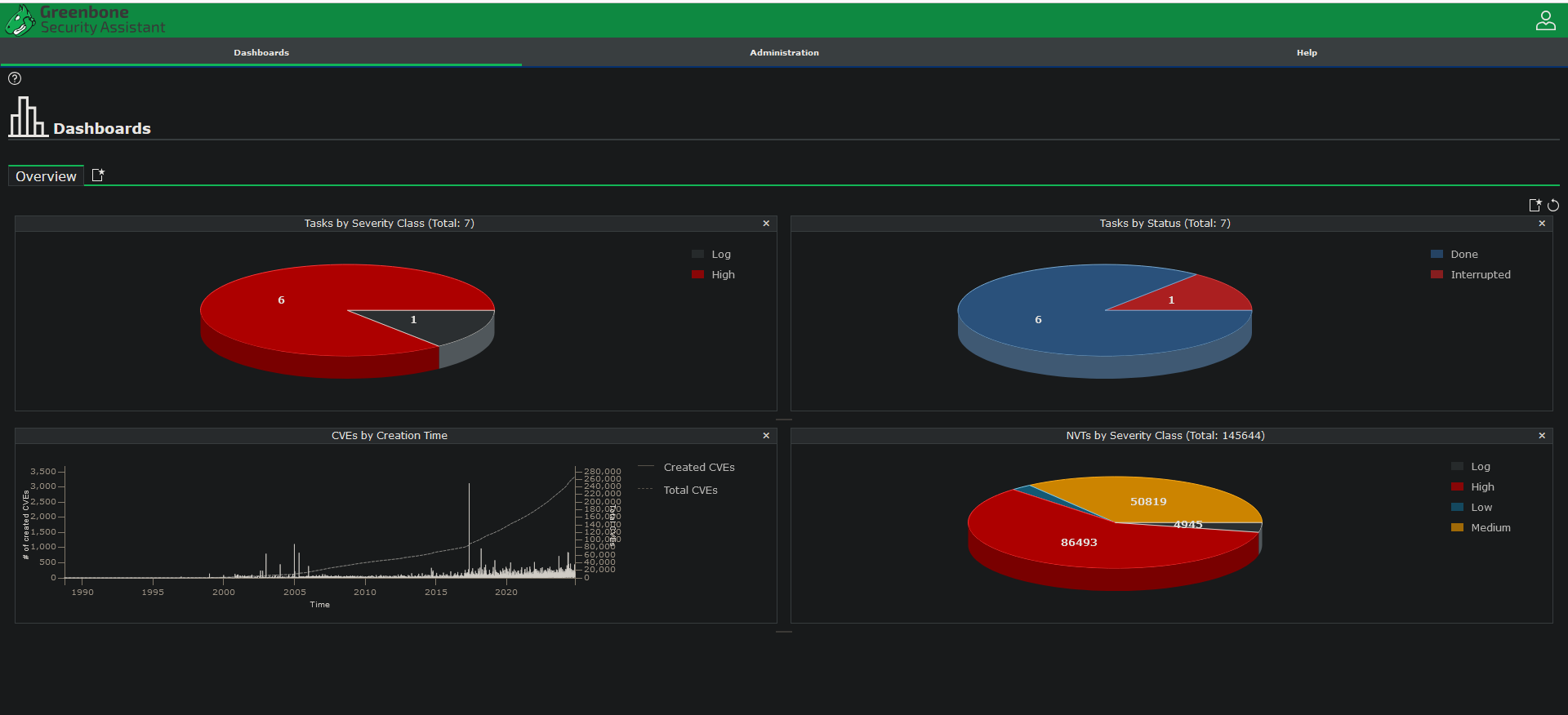
If you need a true automated free vulnerability scanner that checks open ports against known CVE databases, OpenVAS (part of the Greenbone Vulnerability Management suite) is the premier open-source solution. As an open-source security tool, it bridges the gap between basic port sweeps and deep risk management.
While Nmap tells you port 443 is open, OpenVAS probes that port to tell you that the specific SSL/TLS certificate is expired or susceptible to Heartbleed. In our deployment tests, OpenVAS generated detailed executive reports outlining system risks prioritized by CVSS scores.
Key Capabilities
Database containing over 100,000 Network Vulnerability Tests (NVTs).
Scheduled scanning and automated PDF/HTML compliance reporting.
Comprehensive coverage of unpatched software, misconfigurations, and default passwords.
The Downside
It is resource-heavy. Setting up Greenbone on a local machine requires significant RAM (minimum 8 GB dedicated to the VM) and initial feed updates can take a long time to sync over slower connections.
4. Masscan: High-Speed Port Sweeping for Massive Networks
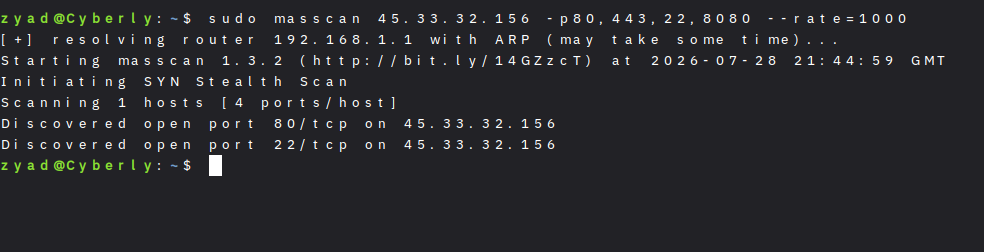
When speed is your only priority, Masscan is unmatched. Written specifically to scan the entire Internet in under 6 minutes (given adequate bandwidth), Masscan operates similarly to Nmap but uses an asynchronous transmission engine.
In our lab benchmarks, sweeping a /16 network for open port 80 took Nmap several minutes, whereas Masscan finished the sweep in under 15 seconds. It achieves this speed by bypassing the operating system's native TCP/IP stack and generating raw sockets directly.
Key Capabilities
Asynchronous transmission engine capable of driving 10 million packets per second.
Syntax designed to be highly compatible with standard Nmap arguments.
Excellent for rapid initial target discovery across large enterprise ranges.
The Downside
Masscan does not perform advanced banner grabbing or OS detection. It is strictly a "fire-and-forget" port sweeper. Furthermore, running it at maximum speed can easily crash low-end home routers or trigger immediate network bans.
5. Angry IP Scanner: Lightweight Host Discovery
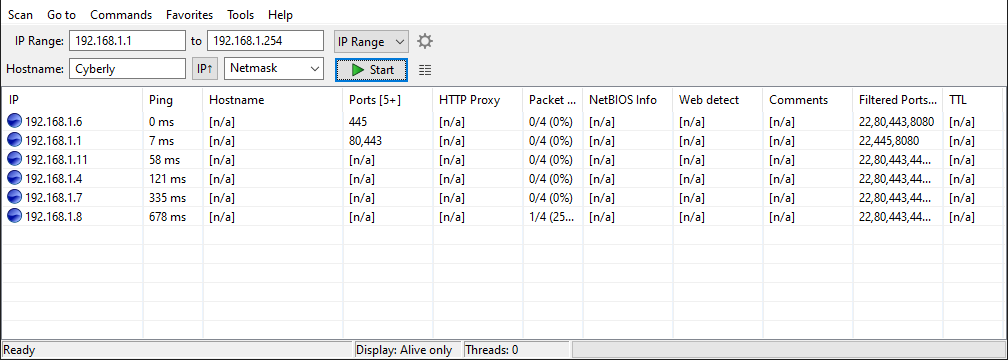
Angry IP Scanner is a cross-platform, lightweight utility designed for fast IP address and port scanning. Unlike OpenVAS or Nmap, it requires zero complex command-line knowledge or heavy installation setup.
When we need to quickly map an unknown local network to find assigned IP addresses, connected IoT devices, or active NetBIOS names, Angry IP Scanner gets the job done in seconds via a clean multithreaded interface.
Key Capabilities
Extremely fast multithreaded host discovery using ICMP pings and port probes.
Exports results into CSV, TXT, or XML formats easily.
Resolves hostname, MAC address, and NetBIOS information automatically.
The Downside
It lacks deep vulnerability assessment features. You cannot run security scripts or perform complex CVE lookups; it is built purely for inventory mapping and basic host detection.
Direct Comparison Matrix for Vulnerability Assessment Tools
To help you pick the exact tool for your current workflow, here is how the top 5 free network scanners stack up side-by-side:
| Tool Name | Primary Use Case | Speed | Learning Curve | CVE Detection Depth |
| Nmap | Recon & Port Fingerprinting | Medium-Fast | Moderate | Moderate (via NSE) |
| Wireshark | Packet Analysis & Traffic Inspection | Real-time | High | Manual Analysis |
| OpenVAS | Full Vulnerability Assessment | Slow | High | High (Automated) |
| Masscan | Massive Scale Port Sweeping | Ultra-Fast | Moderate | None |
| Angry IP Scanner | Local Subnet Host Discovery | Very Fast | Very Low | None |
How to Build a Complete Recon Workflow
A single scanner will never give you a complete picture of your target security posture. In our testing labs, the most effective approach is a layered workflow:
Host Discovery: Use Angry IP Scanner or Masscan to rapidly map active IP addresses across the subnet.
Port & Service Fingerprinting: Feed those live IPs into Nmap (nmap -sV -sC -iL targets.txt) to extract open services, OS versions, and basic script flaws.
Deep Vulnerability Audit: Launch OpenVAS against high-value targets identified by Nmap to generate a prioritized list of actionable CVEs.
Traffic Verification: Keep Wireshark running on your interface during active testing to capture cleartext transmissions and debug connection drops.
When executing active scans across remote networks, always ensure your testing machine is properly routing traffic through an encrypted tunnel. For details on protecting your host IP during network diagnostics, check out our guide on the 5 Best Paid VPNs for Hacking & Anonymity in 2026.
Additionally, if you are analyzing these tools inside a virtualized pentesting environment, ensure your guest machines are properly segregated from your local network. You can review our step-by-step tutorial on How to Build Your First Hacking Lab Using VirtualBox 7.2.8 to prevent accidental network leaks.
❓ Frequently Asked Questions (FAQ)
Is network scanning illegal?
No, but context is everything. Scanning networks or hosts that you do not own or do not have explicit written authorization to test is illegal in many jurisdictions. Always perform vulnerability assessments inside an isolated local lab, on client targets with a signed scope of work, or on legal platforms like TryHackMe and Hack The Box.
Can a free network scanner replace a commercial security tool?
For small-to-medium environments, home labs, and standard penetration testing engagements—absolutely. Free and open-source tools like Nmap, Wireshark, and OpenVAS match most core capabilities of paid suites. Commercial tools mainly add automated compliance reporting, enterprise integrations, and dedicated support.
What is the difference between a port scanner and a vulnerability scanner?
A port scanner (like Nmap or Masscan) simply discovers active hosts and identifies which network ports are open and listening. A vulnerability scanner (like OpenVAS) goes a step further by actively probing those open ports against CVE databases to detect unpatched software, misconfigurations, and known exploits.