
With the massive rise of competitive mobile gaming, millions of players are shifting towards playing mobile titles on their computers. Utilizing a keyboard and a high-performance gaming mouse offers an undeniable competitive edge. However, behind the seamless frame rates lies a critical technical question: Are Android emulators actually safe for your PC and your private data?
To understand the risks, we must look beyond the surface and analyze emulators through a strict technical and cybersecurity lens.
The Pros: Why Gamers Love Android Emulators
Gamers constantly seek an android emulator performance boost for a smoother, high-FPS experience on desktop hardware.
- Android Emulator Performance Boost & Higher FPS: Emulators break the thermal limits of standard mobile devices, allowing resource-heavy games to utilize desktop hardware for a smoother, high-FPS experience.
- Precision Control Mapping: Emulators allow players to map touch-screen controls directly to mechanical keyboards and gaming mice, radically increasing accuracy in competitive matches.
- Device Longevity: Running demanding applications on a PC saves your smartphone's battery health and prevents hardware degradation caused by extreme thermal throttling during prolonged gaming sessions.
The Cons: Performance Bottlenecks & Hardware Strain
From a pure systems architecture perspective, emulators are heavily taxing on desktop environments due to how they manage hardware allocation.
Resource Exhaustion
Unlike native PC games that communicate directly with your operating system, an emulator must translate ARM architecture (used by phones) into x86 architecture (used by PCs) in real-time. This translation layer requires massive overhead, causing high CPU and RAM consumption that can severely slow down host systems with lower specifications.
The Virtualization Requirement
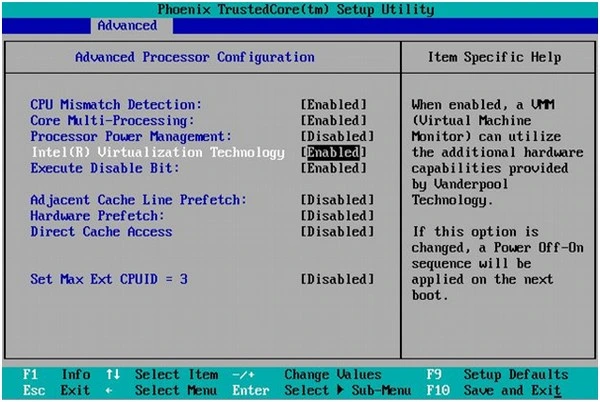
To run smoothly, emulators require you to enable Hardware Virtualization (VT-x or AMD-V) inside your system's BIOS. While safe when configured correctly, failure to optimize this setting for pc virtualization gaming forces the emulator to use software emulation, leading to severe lag spikes, micro-stuttering, and artificial hardware bottlenecks.
The Dark Side: Cybersecurity Risks & Account Security
The real danger does not stem from legitimate emulation technology, but from modified, third-party distribution channels.
Crypto-Jacking & Trojan Miners
Many cracked platforms secretly bundle an emulator crypto jacking malware script that runs silently inside the system background. Because emulators naturally consume high hardware resources, malicious developers frequently distribute these modified versions embedded with hidden Trojan Miners. These scripts run silently, hijacking your graphics card (GPU) to mine cryptocurrency for hackers, which leads to permanent performance degradation and high power consumption.
Data Logging and Host Directory Traversal
Untrusted or unverified emulators often request excessive system administrative privileges during installation. If compromised, a malicious emulator can bypass sandbox isolation, gain access to your local Windows directories, and harvest sensitive browser cookies, credentials, and stored sessions.
Publisher Anti-Cheat Flags
Using unauthorized or modded emulators can trigger strict server-side anti-cheat systems. Major competitive game publishers monitor device signatures heavily; running games through a compromised emulation layer can result in immediate, permanent account bans for violating terms of service.
How to Use Android Emulators Safely: The Technical Guide
Finding and configuring a safe android emulator for pc requires implementing proper technical guardrails to ensure your system remains secure.
Step 1: Stick to Official, Verified Sources
Avoid downloading emulators from unverified sources, shady file-sharing platforms, or modified links. Always access software directly through official vendor domains, such as the official BlueStacks emulator or the Google Play Games desktop application.
Step 2: Enforce Strict Sandbox Isolation
Do not map your real Windows user folders (like Documents or Downloads) as shared directories inside the emulator configuration. Treat the emulator as an isolated sandbox; if a malicious file enters the emulated Android environment, it should have zero pathways to access your host Windows files.
Step 3: Enable BIOS-Level Virtualization Securely
Ensure Hardware Virtualization is enabled via your motherboard's BIOS menu to offload the emulation processing directly to your CPU architecture. Combined with a robust, active firewall, this ensures peak performance without compromising core system kernel stability.
🙋♂️ FAQ: Frequently Asked Questions
Q1: Can an Android emulator infect my actual Windows PC with a virus?
Yes, if it is an unofficial or modified version. While standard emulators use a sandbox to keep Android files separate, a compromised or cracked emulator installer can execute malicious payloads on your Windows host system during installation.
Q2: Why does my antivirus flag some emulator files as a threat?
Legitimate emulators sometimes trigger false positives due to how they access system kernels to enable hardware virtualization. However, if you downloaded the installer from an unverified source, treat that flag as a real threat it likely contains an injected adware or mining script.
Q3: Does running an emulator damage my PC components permanently?
No. An emulator cannot physically damage your components. However, running a poorly optimized emulator for hours can cause continuous high thermal loads. Ensure your system has proper cooling to avoid thermal throttling.